This guest post is by Aman Basanti of Ageofmarketing.com.
When it comes to turning casual visitors into regular readers there are two main options—FeedBurner and Aweber.
FeedBurner uses Feed-based
technology (RSS and Atom) to send updates to your blog subscribers.
Owned by Google (Google bought it in 2007 for $100 million), FeedBurner
is one of the biggest feed syndicators on the Internet.
It works like this: a site visitor subscribes to your feed and every
time you add a new post, a message is sent to them alerting them of the
addition. The subscriber needs special software (a feed reader) to
access the feed.
For more information on feeds, see Darren’s post,
What is RSS?
Aweber is email-based technology
that allows you to send automated email messages to your subscribers. It
works similarly to a feed but does not require special feed-reading
software, only an email address to subscribe to a blog.
Aweber is the most popular autoresponder software system on the Internet. Other popular brands include
Infusionsoft,
MailChimp, and
GetResponse.
Advantages of FeedBurner
- FeedBurner is free, Aweber costs money: The key
advantage of using FeedBurner instead of Aweber (or other
auto-responders) on your blog is that FeedBurner does not cost anything.
Aweber, on the other hand, can cost $20-$100 a month depending on the
number of subscribers you have.
- FeedBurner take less effort: Most popular blogging
platforms (WordPress, Blogger, TypePad etc.) publish feeds
automatically. There is nothing more to do on top of publishing a post.
With auto-responders, however, you have to manually setup the messages
and sequence them (but you can now set up a blog broadcast in Aweber,
which creates an automatic email newsletter).
- FeedBurner supports both feed readers and email subscribers:
The key advantage of auto-responders like Aweber used to be that you
did not need special software to subscribe, only an email address. As
millions of people still do not have feed readers or prefer email, this
meant that you still needed an aut-responder to capture those readers.
But FeedBurner changed all that by allowing people to subscribe to a
feed using an email address. This means that while an autoresponder only
supports email, FeedBurner supports both feed readers and email.
Given that FeedBurner is free, easy to set up, effortless to use, and
supports both feed readers and email, why would you want to pay for an
auto responder?
The fatal flaw in feeds
The key thing that you cannot do with a feed is sequence messages:
you cannot create a series of messages to be sent to your subscribers.
This means that your subscribers only get alerts for posts that are
added after they subscribe.
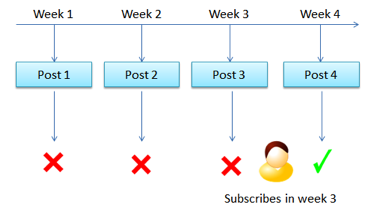
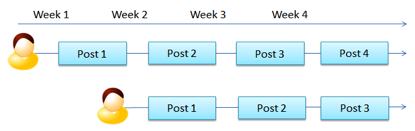
For example, say you post four articles over four weeks, and a
visitor subscribes to your blog after week three. This means they will
only get alerted about the fourth post, and will not receive posts one
to three, as shown in the image below.

In FeedBurner, you cannot send alerts for older posts
Now, if you post time-sensitive information (news or latest
developments) on your blog, this doesn’t matter. But if you publish
evergreen content, or you want to take your blog readers through a
specific set of messages, the ability to sequence is crucial.
Autoresponders allow you to do just that. You can create a sequence
of messages, set how long the wait is between each message, and the
autoresponder will execute that for you for each subscriber, regardless
of when they join, as shown below.

Aweber allows you to create a sequence of messages
Then there are the other benefits of auto-responders like
Aweber—customization of look and feel of emails, personalization (“Hi
John”), controlling the wait period between messages, solid delivery
rates, split-test multiple lead capture forms, and so on.
The audience factor
A third factor in deciding which system to use is your audience. If
you have tech-phobic audience, then an email-based system like Aweber is
likely better for you.
For tech-savvy audiences, on the other hand, FeedBurner may be
better. Technically inclined people are more likely to use and prefer to
get their blog updates through feeds. Feeds also have the added benefit
of allowing another blogger to include your feed on their blog,
creating free exposure and traffic for your blog.
The best way to find out what your audience wants is to have both
options on your site for a month and see what your readers prefer. You
may even find that it is useful to have both.
The bottom line
If you have a small budget, publish time-sensitive information,
and/or cater to a tech-savvy audience, FeedBurner will be sufficient for
your blog.
If, on the other hand, you want to take your subscribers through a
sequence of messages and control the wait periods between the messages,
then Aweber is better suited to your blog.
What are you using: Aweber, FeedBurner … or something else? Tell us how you do it in the comments.
by
Darren Rowse